

Every growing business hits the same wall sooner or later. Servers get old, software needs constant patching, the IT bill keeps creeping up, and the team spends more time keeping systems alive than building anything new. If that sounds familiar, you’re not alone, and it’s exactly why so many companies are moving to the cloud.
At OrionSoft Technologies, we’ve seen this shift up close. Cloud solutions for business aren’t just a technical upgrade anymore. They’re a practical way to spend less, work faster and stay ready for whatever comes next. Let’s break down how that actually happens.
What Are Cloud Solutions, Really?
In simple terms, Cloud Solutions let you use computing power, storage, databases and software over the internet instead of owning and maintaining all of it yourself. You pay for what you use, much like an electricity bill. Most services fall into three models:
- IaaS (Infrastructure as a Service): Virtual servers, storage and networking on demand.
- PaaS (Platform as a Service): A ready environment where your developers build and deploy apps without managing the underlying machines.
- SaaS (Software as a Service): Finished tools like CRM, accounting or email that you simply log in and use.
How Cloud Solutions Reduce Costs
The savings don’t come from one big thing. They come from many small ones adding up.
- No heavy upfront investment. Skip the expense of buying servers, networking gear and setting up a server room. You start with a subscription instead of a large capital outlay.
- Lower maintenance spend. Power, cooling, hardware repairs and physical security become the provider’s job, not yours.
- Smarter use of your IT team. Updates, backups and monitoring can be automated, so your people can focus on projects that move the business forward.
- Pay only for what you use. Quiet month? Your bill drops. Busy season? You scale up for as long as you need and no longer.
- Less downtime. Built-in redundancy and disaster recovery protect you from the kind of outage that quietly costs thousands.
Here’s how the two approaches compare side by side.
| Area | Traditional On-Premise IT | Cloud Solutions |
| Upfront cost | High (hardware, licences, setup) | Low (subscription or usage-based) |
| Maintenance | Handled by your in-house team | Handled by the provider |
| Scalability | Slow and limited by hardware | Instant, on demand |
| Deployment speed | Weeks or months | Hours or days |
| Disaster recovery | Costly to build and test | Built in, often automated |
| Remote access | Needs extra setup | Available from anywhere |
| Cost pattern | Fixed, even when idle | Flexible, tied to usage |
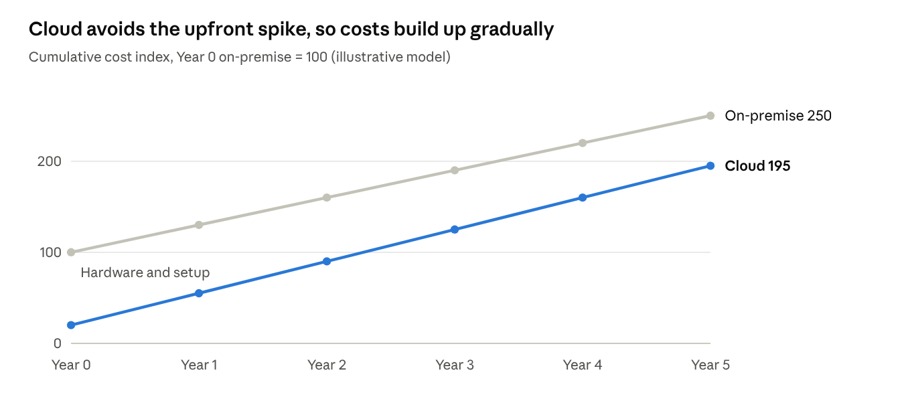
The pattern over time looks like this: on-premise spending is front-loaded, while cloud spending builds gradually as you use it.
The figures are illustrative and only show the pattern. Your actual savings will depend on your workloads, your provider and how well the setup is optimized.
How Cloud Solutions Improve Efficiency
Cost is only half the story. The other half is how much smoother everyday work becomes.
Faster launches. There’s no waiting for hardware to arrive. A new app or environment can be live in a fraction of the time, which means you can respond to the market while the opportunity is still there.
Better teamwork. When files, tools and data live in one secure place, your team can work together from the office, from home or from another city without version confusion.
Automation by default. Patching, backups and monitoring run quietly in the background. Fewer manual tasks means fewer human errors.
Smarter decisions. Cloud platforms make it far easier to connect analytics, AI agents and reporting tools, so leaders get clearer data without a long setup process.
Room to grow. Adding users, storage or processing power takes a few clicks, not a new purchase order.
Here’s how a typical move to the cloud works in practice.
The first three steps get you onto the cloud. The last two, optimizing and monitoring, are where you keep trimming waste and improving performance.
Who Benefits the Most?
Small and mid-sized businesses get access to the same kind of infrastructure that once belonged only to big enterprises, without the matching price tag. Larger organisations benefit from handling traffic spikes, complex workloads and long-term digital transformation without constantly rebuilding their setup. Startups, eCommerce stores, finance firms, healthcare providers and service companies all see gains, just in different ways.
What to Look for in a Cloud Partner
The technology matters, but the partner you pick matters just as much. Look for a team that offers:
- A cloud strategy built around your goals, not a one-size-fits-all package
- Transparent pricing with no surprise charges
- Strong security and compliance practices
- Smooth migration with minimal disruption
- Ongoing monitoring and support after go-live
At OrionSoft Technologies, we help businesses plan, move to and manage cloud environments that are practical, secure and cost-conscious, so the savings you expect actually show up on your bill.
Final Thoughts
Cloud solutions help businesses spend smarter and work faster. You cut upfront costs, reduce maintenance headaches, and gain the flexibility to grow without constant rework. More importantly, your team gets time back to focus on innovation instead of infrastructure.Want to see it in action? Talk to OrionSoft Technologies and book a free demo.
If you’re ready to see what the cloud can do for your business, the team at OrionSoft Technologies is happy to talk it through.
Frequently Asked Questions
How do cloud solutions reduce IT costs? They replace large upfront hardware purchases with pay-as-you-go pricing, and they cut spending on maintenance, power, upgrades and in-house support.
Are cloud solutions safe for business data? Yes, when set up properly. Leading providers offer encryption, access controls, compliance support and continuous monitoring, which is often stronger than what a small company can build on its own.
Can small businesses really benefit from the cloud? Absolutely. Small businesses can start small, pay only for what they need and scale gradually as they grow.
How long does cloud migration take? That depends on the size and complexity of your systems. Simple setups can move in days or weeks, while larger environments need phased planning.